Your tasks and their due dates live in the integration you plan in. Ganttify lays them out as a plan you can move, and every date you change goes back to your project.
Let's build your first Gantt chart. When you first open your chart, you may see only a few checkmarks, or an empty grid.
Tasks that only have a due date are shown as a checkmark. Tasks without any dates yet, get an empty row.
To plan a task over several days, right-click its empty row, and choose Add Time Block.
Pick a color, and there's your time block, with its Start and End dates right next to the task.
To move it to other days, drag the middle of the block. Need more time? Drag its right edge.
Already have a due date? Right-click the checkmark, choose Convert to Time Block, and the checkmark becomes a block. To set when the work starts, drag its left edge. Does one task have to wait for another? Right-click the first one, choose Add Dependency, and click the task that waits.
Running late? Drag the first task, and everything that depends on it moves along.
Only need a deadline after all? Right-click the time block, choose Convert to Due Date, and it's a checkmark again.
Want key dates to stand out? Right-click the checkmark, and pick an icon, like a flag for launch day.
Want to see which work belongs together? Right-click a block, and give it its own color.
Then, name that color in the legend, so everyone reading your chart knows what it stands for.
Do the same for the rest of your tasks, and your project becomes a Gantt chart, a plan you can see at a glance. And that's how you build your first Gantt chart, in Ganttify.
Teams at these companies plan with Ganttify
In short
What does Ganttify do?
It turns your projects into a Gantt chart and keeps the two in step. Your tasks and dates stay where they are. Ganttify reads them each time you open the chart and draws every task as a time block on one timeline.
The chart gives you start and end dates, dependencies between tasks, several projects side by side and a read-only view for the people who follow along. Move a date and the change goes back to your project, so the list your team works from always matches the plan.
What it does for you
One plan you can see, trust and share
See the whole plan
A Gantt chart for multiple projects
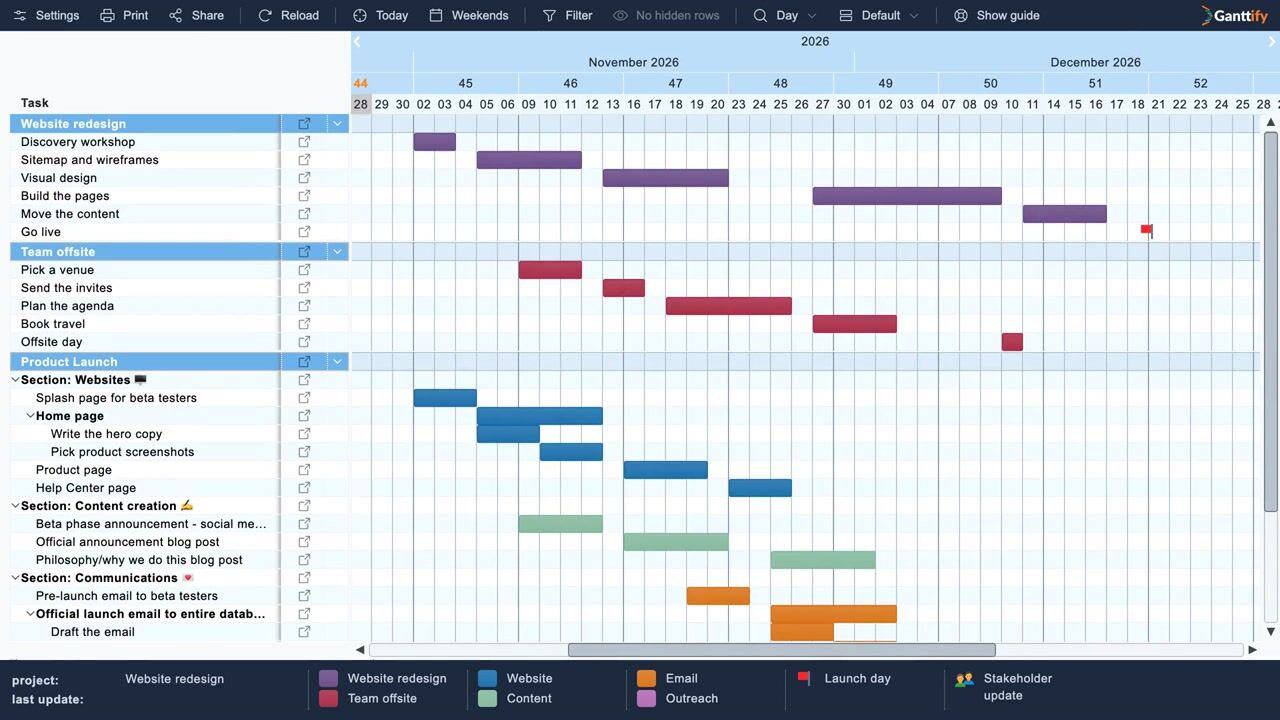
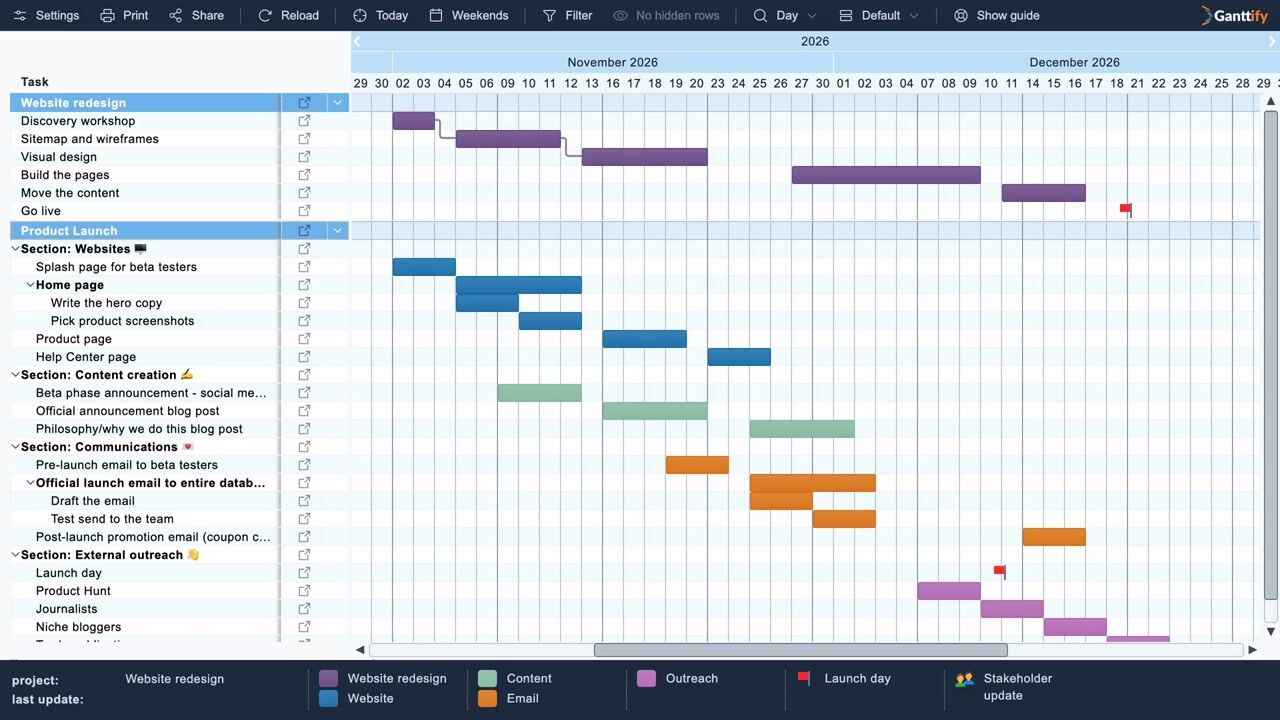
Pick the projects you want to see together and they share one timeline, every task drawn as a time block from its start to its due date. You see how long the work takes and where two deadlines collide, without opening each project on its own.
Three projects open together on one Gantt chart, then the zoom steps from months to days.
Set a dependency where one task waits on another, even in a different project. When the first one slips, every task that waits on it moves as far as it needs to.
A task moves five days later and the two tasks after it follow.
Give clients and stakeholders read-only access to the plan. They open the link in their browser, without an account and without learning the app your team works in, and every time they open it they see the latest dates.
Show transcriptHide transcript
A plan works best when everyone can see it. Click Share, and choose who gets access.
Type a team member's name, and pick them from the list. They join as Read-Only, so they can follow along.
Ready to collaborate? If they have access to your projects, switch them to Can Edit.
Working with a client? Choose Anyone with the Link.
Confidential plan? Turn on Password Protected, type a password, and click Save.
Then click Copy Link, and paste it into an email. Send the password separately, by text message.
Your client opens the link, enters the password, and sees your chart right in their browser, no account needed.
And when your plan changes, their chart is always up to date, with nothing to send again.
Dependencies, sharing and export work the same way wherever your projects live, and one subscription covers whichever integration you connect. Pick yours to see what the chart looks like there.
Create your account and sign in with the integration your team plans in.
Pick your projects
Choose one project or several. Your tasks and dates load straight from the integration.
Plan on the chart
Set start and end dates and dependencies, and share the chart read-only once the plan is ready.
1
Connect your integration
Create your account and sign in with the integration your team plans in.
2
Pick your projects
Choose one project or several. Your tasks and dates load straight from the integration.
3
Plan on the chart
Set start and end dates and dependencies, and share the chart read-only once the plan is ready.
From our users
What Ganttify users say
“
Setting up Ganttify for Basecamp was super easy. Charts were created instantly, and our team quickly got their schedules in place. Now we have clear visual timelines that make spotting conflicts and errors a breeze.
Jill PersinOps DirectorUses Ganttify with Basecamp
“
Ganttify finally gives our Todoist boards the timeline discipline they were missing. Building dependencies on the chart keeps our priorities clear while the sync updates the team's daily plan automatically.
Rick MillerCEO, Sensible Financial Planning and ManagementUses Ganttify with Todoist
“
Using Ganttify to schedule complicated projects in Basecamp has been seamless. It fills in critical gaps that help our team stay in sync and on schedule.
OwnerBasecamp userUses Ganttify with Basecamp
“
Ganttify has provided the clear and global view of our projects' timelines in Basecamp that we needed. Because of the integration with Basecamp, I am able to quickly share a large amount of information with colleagues and leadership in a way that is easily accessible. Very glad to have found this tool!
Senior Project ManagerBasecamp userUses Ganttify with Basecamp
No. Your projects stay in the integration you already use. Ganttify reads them each time you open the chart, and the dates you change on the chart are saved back there. Ganttify keeps only the planning it adds itself, such as dependencies and the colors of your time blocks.
Can I put several projects on one Gantt chart?
Yes. Pick several projects when you open a chart and they share one timeline. You can set dependencies between tasks in different projects too, so a slip in one project moves the work that waits on it in another.
Can I give clients read-only access to my Gantt chart?
Yes. Share the chart read-only and anyone with the link opens it in their browser, without a Ganttify account or an account for your integration. The chart loads fresh every time it opens, so clients and stakeholders always see the latest dates.
How do I stop sharing a Gantt chart?
Open the share dialog and set General access to "Only people with access". The link stops working straight away. If you share the chart again later, you get a new link.
Can my team edit the chart with me?
Yes, on the Small Team and Large Team plans. Add team members to a chart and choose Read-only or Can edit for each of them. To edit, a team member needs access to the same projects in your integration.
Can I export my Gantt chart?
Yes. Export the whole chart or just the dates you pick, as a PDF or an image for a status report or a meeting.
Can I connect more than one integration?
Yes. Connect each integration you plan in to the same Ganttify account, then pick the projects you want to see as a Gantt chart.
How much does Ganttify cost?
Every account includes a free 14-day trial, so you can try Ganttify on your own projects before you pay anything. No credit card needed. When it works for you, the pricing page has the plans.
Try it on your own projects
Your first Gantt chart is ready in under two minutes. The first 14 days are free, and you don't need a credit card.